V2 · 12 servosDated experiment
Two Builds: Wired, Wireless and ROS 2 Integration
Ainekio splits into an onboard-Q6A Wired build and an offboard-Q6A Wireless build. ROS 2, local IMU feedback and the new battery budget have distinct implementation stages.
Published 7 min read
Two ways to build the twelve-servo robot
Later development — October 6: Wireless is now the priority. The new control and sensing entry records steering updates, the implemented IMU estimator and connection tests. The heavy bank has been dropped in favor of batteries and onboard charging boards in the lighter rebuild. The two-port bank budget below is the historical September 28 plan.
The next Ainekio now has two build options. Wired carries the Radxa Dragon Q6A on the robot, with a planned native-USB connection to the ESP32-P4. Wireless moves the Q6A off the robot and uses Wi-Fi for the body connection. Greg confirmed this split for the September 28 update. Both keep twelve servos, local P4 motion control and MetaHuman OS for conversation and higher-level decisions.
Blender now has independent Wired and Wireless design scenes. The Wireless body is being narrowed around its battery and smaller electronics package; the Wired option retains the space needed for the Q6A. The mechanical entry follows those changes.
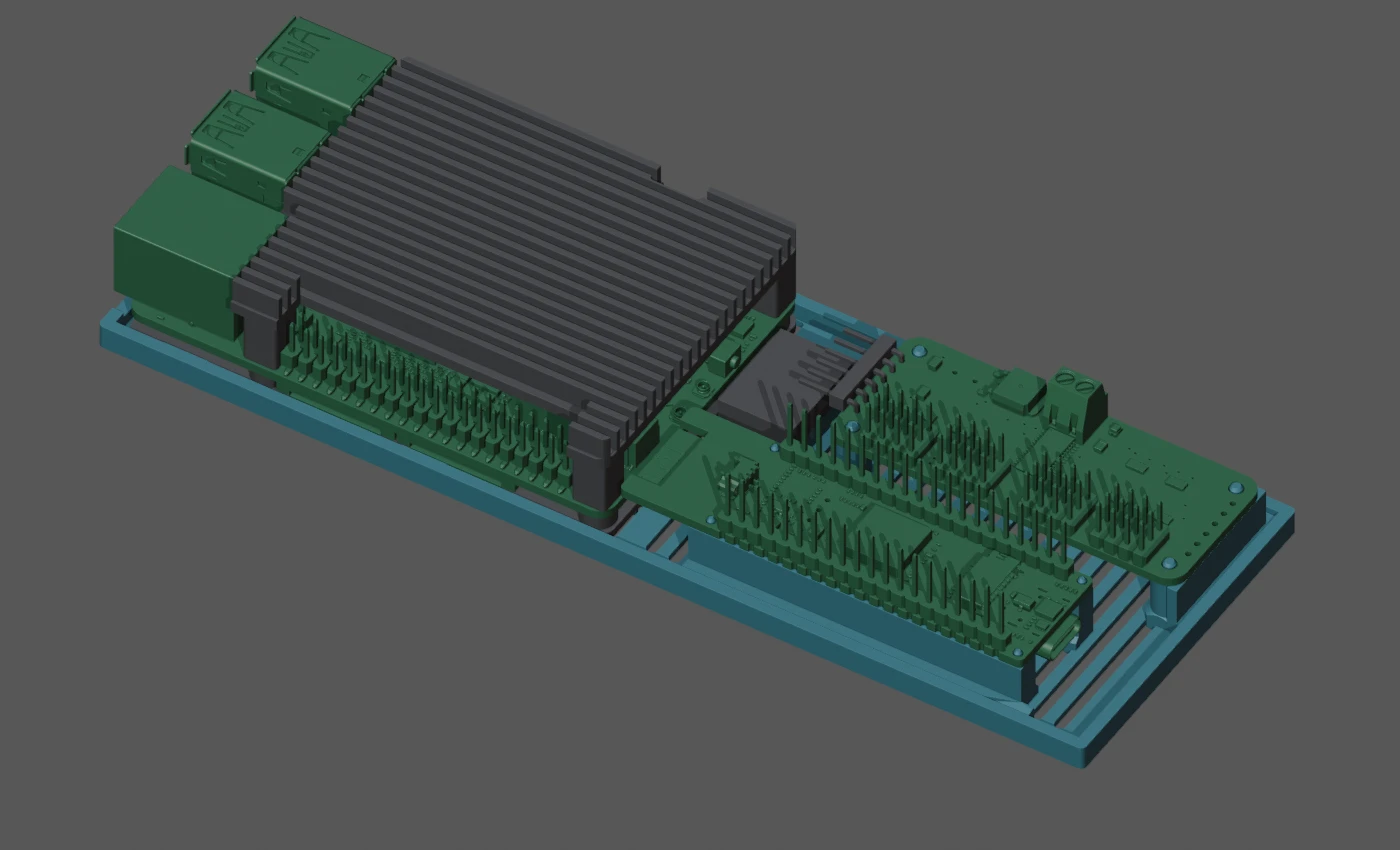
Wired and Wireless side by side
| Build decision | Wired | Wireless |
|---|---|---|
| Where the Q6A sits | Onboard, in the robot’s electronics tray | Offboard, powered separately |
| P4-to-Q6A connection | Native USB proposed; body transport and host adapter still to implement | Existing Wi-Fi body transport through the P4’s ESP32-C6 and gateway |
| Connection onward to the desktop | Q6A Wi-Fi; “Wired” does not mean a required desktop tether | Offboard Q6A provides the host side of the body link |
| What the robot carries | P4, servo driver, Q6A and its case, peripherals, battery and twelve servos | P4, servo driver, peripherals, battery and twelve servos; Q6A stays offboard |
| Current mechanical record | 100.3 mm outer-support baseline, with onboard tray development | 82.5 mm outer frame; front legs moved forward; tray, supports and panels still need refitting |
| Power arrangement being budgeted | One bank branch for Q6A; another for P4 electronics plus servos | Separate bank branches for P4 electronics and servos; Q6A draws no power from the carried bank |
| Main tradeoff | Carries the host, but adds onboard mass and power demand | Frees onboard space and removes Q6A demand from the battery, but depends on the wireless host link |
| Measured whole-robot runtime | Not measured | Not measured |
Transport and computer placement are separate engineering choices. An onboard Q6A could also use Wi-Fi to the P4; the budget retains that comparison. The two build labels above describe the selected development directions, not two completed or physically qualified robots.
Where ROS 2 fits
ROS 2 Jazzy is installed on the Q6A. The Ainekio ROS adapter and robot graph are still integration work. The September 28 audit found no deployed ROS body-control graph, selected vision pipeline or ROS balance controller.
The proposed first step is to publish telemetry from the existing gateway: camera images, timestamped IMU samples once the sensor is integrated, and available body state. ROS 2 lets separate programs exchange data through topics, services and actions. Its tools can then help inspect and record the robot’s behavior. ROS 2 Jazzy node concepts.
| Tool or responsibility | Intended use | Work still required |
|---|---|---|
| Q6A ROS adapter | Publish the gateway’s telemetry for ROS consumers | Implement message mapping, timestamps, freshness and bounded queues |
| RViz | View images, coordinate frames and a robot model on the desktop | Publish the data and provide a robot model with transforms; commanded joint angles must not be presented as measured shaft positions |
| rosbag2 | Record selected sensor topics for diagnosis and replay | Select topics and recording rates; account for storage and message copies |
| Future ROS action requests | Request supported actions through Ainekio’s gateway | Preserve existing admission, cancellation and result handling |
| MetaHuman OS | Conversation, personality, memory and high-level intent | Continue using the existing robot interface |
| ESP32-P4 | Linkage solving, gait timing, output supervision and future local posture correction | Integrate sensing and feedback into the existing motion controller |
RViz can display images, robot models and coordinate transforms; rosbag2 records and replays published topics. Installing either does not connect those tools to Ainekio by itself. The gateway remains the command authority, with one path to the P4’s motor outputs.
From variable gait to responsive gait
The implemented motion system already changes stride and cadence while walking, switches Walk/Run, and supports Crawl and six-direction Crab. The latest revision lowers the working body references and improves geometric leverage. A separate saved Motion speed (×) setting now controls Stand, Sit and finite gestures. The gait journal records the parameter changes and controller validation.
Active response to body tilt needs a further loop: acquire angular velocity and acceleration from the LSM6DS3, estimate attitude, then adjust the gait through the P4’s existing motion/output controller. The integration record reports the sensor received; its installation, driver and feedback operation are not yet verified. An IMU alone does not measure foot loads or actual servo shaft angles.
The proposed starting rates are 208 Hz IMU acquisition and the existing 50 Hz servo target/PWM cadence. They are different jobs with different rates. The fast correction loop belongs on the P4, without a round trip through ROS, the Q6A, the desktop or an LLM. Responsive balance and terrain adaptation remain goals to implement and test on the assembled body.
Why investigate native USB?
The Wired design aims to give camera and audio traffic a dedicated body link while the Q6A uses Wi-Fi upstream. On the P4 board, the native USB interface is on P1; the CH343 debug USB-C connection is a different interface. The USB class, host adapter, power roles and reconnect behavior are not yet built.
The media target under investigation is 1080p at 30 frames/s with hardware JPEG, plus 24 kHz speaker audio and a microphone stream resampled to 16 kHz. These are proposed operating targets. The audited software ceiling remains XGA at 15 frames/s, JPEG quality 75 and 16 kHz duplex audio; neither profile is proof of complete simultaneous loaded operation.
| Recorded calculation or observation | Consequence for the design |
|---|---|
| A 256 KiB JPEG at 30 frames/s needs 62.915 Mbit/s before audio and protocol overhead | Measure encoded frame sizes and sustained application throughput; USB’s 480 Mbit/s signaling rate is not usable payload throughput |
| Three 5 MP RGB888 frames occupy 43.249 MiB, more than the P4’s 32 MiB PSRAM | Frame formats, copies and queue sizes matter; the current processed-camera path targets at most 1080p |
| The current link loop can wait 20 ms and then send at most one microphone packet and one JPEG per iteration | Media scheduling still needs attention when changing transport |
| Recorded Q6A Kokoro test: a five-second phrase took 15.068–15.904 seconds to synthesize | Speech response time is a separate bottleneck; a faster body link will not remove synthesis time |
The speech result is from three CPU runs of one phrase on the recorded Q6A setup, with eight threads and 1,537.797 MiB peak process RSS. It is not a conversation benchmark or a new test performed for this article. The integration audit records its conditions and source revision.
The battery plan has changed
The current bank is a SHARGE Pouch P065A, 10,000 mAh / 36 Wh, replacing the Anker fit study described on September 24. The Blender envelope is now 115 × 51 × 26 mm. SHARGE’s capacity specification and the detailed power record are linked below; this envelope is a modeling input, not a complete connector or cable allowance. SHARGE Pouch.
The current power budget uses two 5 V / 3 A branches, or 15 W per branch. This is a design allocation to verify under simultaneous load. For Wired, the Q6A gets one branch and the P4 electronics plus twelve servos share the other. For Wireless, electronics and servos can have separate branches. Unused power on one branch does not make an overload on the other acceptable.
The bank has integrated charging and is removable; no separate buck converter is planned in this arrangement. The earlier plug-in Qi idea has no new implementation result. Battery life is still unmeasured. The 36 Wh cell rating is not all delivered energy, and removing the Q6A’s load does not yet give a measured runtime improvement. Loaded servo peaks, bank behavior and whole-system consumption are the next power measurements.
Sources and next steps
This entry reviews work since the September 24 website publication, through
the source snapshot captured at 13:04 PDT on September 28. It uses robot
commit 270537f, current uncommitted controller records, saved Blender review
notes and Greg’s confirmation of the build split. No robot was commanded,
flashed or physically tested for this website update.
- Body-control integration decisions
- Resource and power budget
- Dated source and image manifest
- Compact chassis, face and assembly work
The next stages are to finish the mechanical fit for each option, implement the USB and ROS adapters, bring up timestamped IMU data, and test local correction and power under stated physical conditions. Those results will extend this journal as they become available.
Two Builds: Wired, Wireless and ROS 2 Integration
https://ainek.io/posts/2026-09-28-wired-wireless-ros2/