V2 · 12 servosDated experiment
Video on the robot, firmware updates over Wi-Fi
Body Control gains SD video recording and downloads, staged P4 firmware updates, robot logs and a measured short Wi-Fi recovery run.
Published 3 min read
Service the P4 through Body Control
The October 13 firmware work adds recording to the internal SD card, clip downloads, Wi-Fi application updates and readable robot logs. These controls use the existing selected-robot connection and authentication.
Record without opening the body
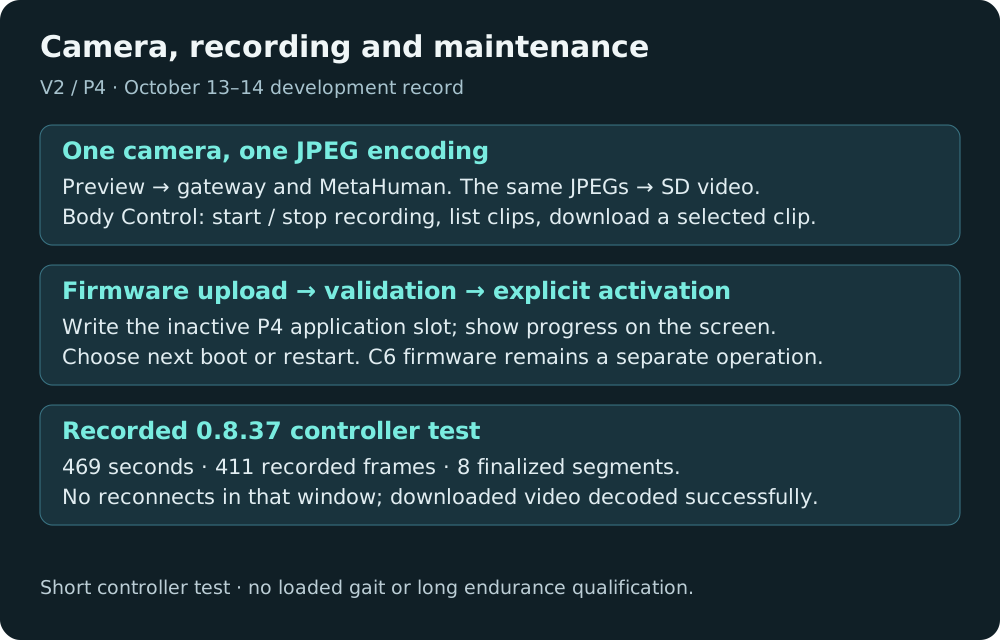
With a formatted FAT card installed, enable the existing camera preview, then use Start recording in Body Control’s video/SD controls. Recording uses the preview’s existing resolution and frame rate; starting it does not turn the camera on or silently select a different profile.
The storage worker writes standard MJPEG AVI clips from already-encoded JPEGs. There is no second camera capture or JPEG encoder, and these clips do not include audio. A segment normally closes at the next frame after 60 seconds, before 64 MiB, or when the camera profile changes. Stop recording finalizes the active clip; refresh the recordings list and download a selected clip without removing the card.
Near capacity, rolling recording overwrites the oldest completed recording. Downloaded clips remain on the card until reused. Unrelated files, unfinished clips and clips currently being downloaded are excluded. Copy recordings you want to keep before they are reused. Firmware does not format the card on an error, and an unfinished file after power loss may require recovery.
The recorder admits a small number of copied frames to the existing storage worker. If it cannot keep up, it records drops rather than making the camera producer wait for a card write. Card faults can still affect the shared SDMMC hardware; ordinary short-run success does not qualify every failure condition.
Upload first, choose activation separately
The firmware panel accepts a P4 application binary. Upload prepares the robot in Doze, finalizes recording, writes the inactive application slot and validates the image. The screen shows preparation, write progress, validation and the staged result.
Uploading does not itself select the new firmware. The operator then chooses Activate on next boot or Activate and restart. Normal updates preserve calibration, pairing and media assets. This path does not update the separate C6 radio firmware or install a partition table.
The first boot checks startup readiness and the authenticated gateway connection before accepting the image. Recorded controller tests include actual bootloader rollback after a reset before acceptance. That establishes the tested rollback path, not a guarantee against every possible flash or hardware fault. Older factory-only installations require an initial USB migration before this update path is available.
Logs are available over Wi-Fi too
Body Control can read or download the robot’s diagnostic log. The retained buffer holds the recent current and previous boot logs across warm resets; power loss clears it. Startup markers and captured panic output help explain a failed boot, but the small buffer can truncate messages and does not replace a full crash dump.
What the hardware run showed
Earlier tests saw reconnects both with and without recording. The Wi-Fi repair keeps the C6 radio awake and lets the existing TCP connection recover from packet delay before the application tears it down. Send and receive handling also use the pinned WebSocket library’s separate transmit lock.
The installed 0.8.37 recovery test produced the following record:
| Measurement | Observed result |
|---|---|
| Observation window | 469 seconds, 235 status samples, one connection epoch and no reconnects |
| Preview and recording | VGA at 1 FPS; 411 recorded frames and eight finalized segments |
| Drops | Zero recording drops and zero sampled camera-queue drops |
| Concurrent download | A 2.88 MB clip downloaded while streaming and recording continued |
| Playback check | Downloaded clip decoded with FFmpeg; MJPEG 640×480, 60-second timeline |
| Delayed acknowledgement | A 1,270 ms TCP acknowledgement delay recovered on the same connection |
This is a successful short controller run, ended before the planned ten minutes. It does not establish long-term wireless reliability, loaded gait performance, sustained audio concurrency or recovery from a faulty/full card. No older clip needed overwriting during that particular run, so its numbers do not qualify rolling reuse under full-card conditions. The original source of radio/transport packet loss remains unresolved.
Later startup and leveling firmware has separate installation records in the October 14 motion report. The media measurements above belong to the stated 0.8.37 test, not every later build.
Source: the P4 recording/OTA hardware record, storage and update implementation, and Body Control maintenance UI, identified in the source manifest.
Video on the robot, firmware updates over Wi-Fi
https://ainek.io/posts/2026-10-14-recording-and-updates/